Dossiers
A dossier is a document type in which you can store and edit all documents related to a specific matter or task. It allows you to track all relevant information, documents, and activities in one place. Other dossiers, cases, and other module documents can be linked or added to a dossier.
Creating a New Dossier
- Click the "Add" button.
- Fill in the basic information: the dossier title, description, subject, select the responsible person, and define the classification code and retention period.
- Save the dossier.

A dossier has no process, but when it is created, the responsible person in charge of resolving it is specified. Both the responsible person and the person who created the dossier have the same options for editing the dossier and performing actions ("Assign for Resolution", "Cancel", "Resolved").
Adding a Linked Dossier
- In the list, select the desired dossier that you created or on which you are the responsible person.
- On the dossier, select the "Linked Dossiers" option.
- Use the "Edit" action.
- Use the "Add" action to add a dossier.
- Select the appropriate dossier from the list.
- Confirm the addition of the dossier from the list.
- Save the dossier.
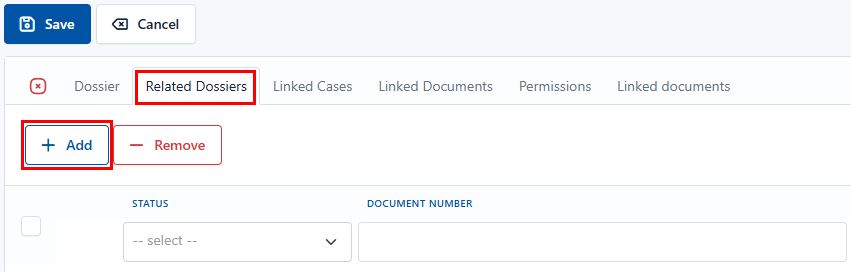

An added linked dossier can also be removed from the list. To do so, while editing the dossier, select the "Remove" option. The desired linked dossier that you want to remove must be selected first. Once confirmed, the linked dossier is immediately removed from the list, and the change must also be saved by clicking the "Save" button.
Adding a Linked Case
- In the list, select the desired dossier that you created or on which you are the responsible person.
- On the dossier, select the "Linked Cases" option.
- Use the "Edit" action.
- Use the "Add" action to add a case.
- Select the appropriate case from the list.
- Confirm the addition of the case from the list.
- Save the dossier.
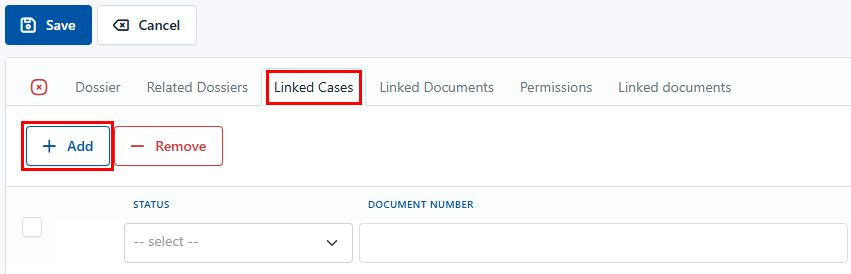
An added linked case can also be removed from the list. To do so, while editing the dossier, select the "Remove" option. The desired linked case that you want to remove must be selected first. Once confirmed, the linked case is immediately removed from the list, and the change must also be saved by clicking the "Save" button.
Adding a Linked Document
- In the list, select the desired dossier that you created or on which you are the responsible person.
- On the dossier, select the "Linked Documents" option.
- Use the "Edit" action.
- Use the "Add" action to add a document.
- Select the appropriate document from the list.
- Confirm the addition of the document from the list.
- Save the dossier.
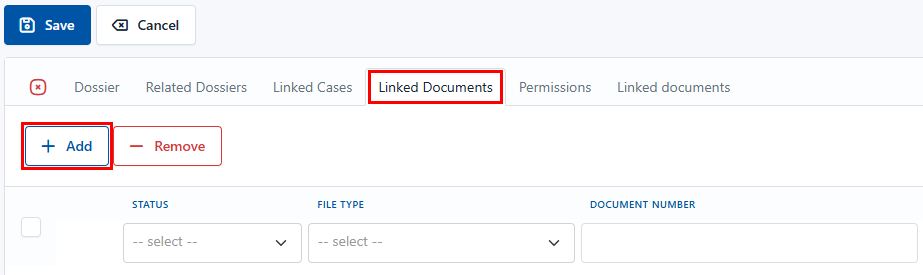
An added linked document can also be removed from the list. To do so, while editing the dossier, select the "Remove" option. The linked document you want to remove must be selected first. Once confirmed, the linked document is immediately removed from the list, and the change must also be saved by clicking the "Save" button.
Available Actions:
- Assign for Resolution – assign the dossier to the responsible person.
- Resolved – mark the dossier as completed once all tasks have been carried out.
- Cancel – cancel the dossier if it is no longer needed or was created by mistake.
Assigning a Dossier for Resolution
The user specified in the Responsible Person field is responsible for resolving the dossier. The person who created the dossier still has the same options for editing and choosing actions.
The task of the user opening the dossier is to:
-
Define the classification code with an appropriate retention period
-
Determine the responsible person (employee) to whom the dossier will be assigned for resolution
-
Determine other data relevant to creating the dossier
In Progress
While the dossier is in progress, additional actions are available that can be performed on the dossier besides editing:
Actions:
- "Resolved" – marks the dossier as resolved or completed.
- "Cancel" – cancels the dossier if further processing is no longer required, or in accordance with your organization's work instructions.