User Interface Overview
The user interface overview provides an overview of the mDocs+ interface for efficient navigation through the system and use of the document management system.
Main interface components
The mDocs+ interface consists of several components:
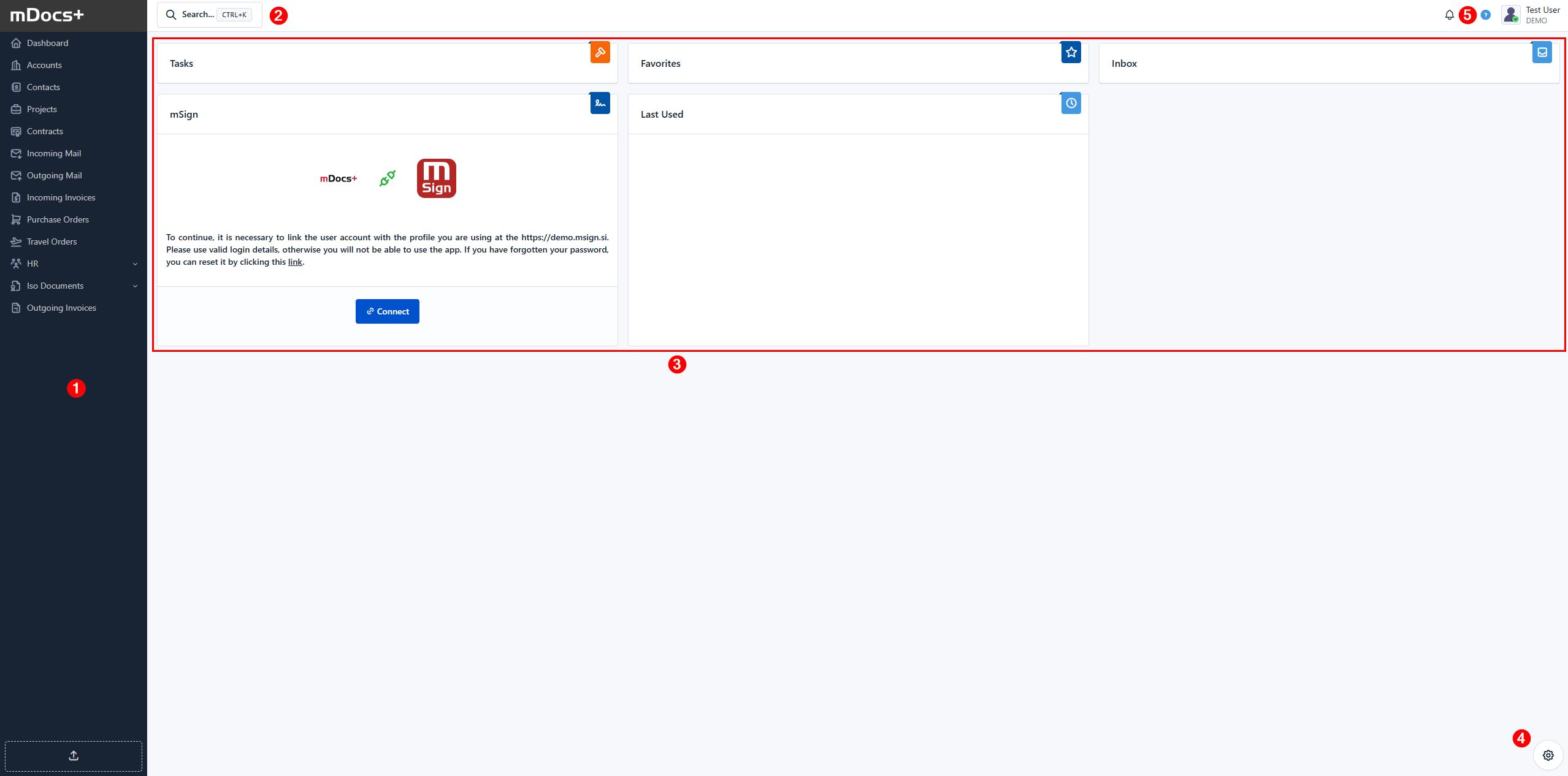
- Navigation menu: (1) A vertical bar that gives users access to the system's modules.
- Search bar: (2) Quick search via the search bar.
- Dashboard widgets: (3) The middle part of the screen shows various widgets, which you can customize to display system information according to your needs and personal settings.
- Widget customization button: (4) In the bottom right corner is a button that provides access to settings for customizing the dashboard widgets.
- User menu: (5) A button that opens a drop-down menu. In this menu you can select the following options:
- Profile: To access your personal and user settings.
- Switch organization: If you are a member of multiple organizations, you can switch between them.
- Administration: Visible and accessible to user(s) with an administrator role and permissions.
- Log out: To securely log out of the mDocs+ system.
Each element is marked in the image with a corresponding number, referring to the descriptions above.