Installing the mDocsX Local Editing Component
The user can edit attachments, such as .doc, .docx, etc., in the document's editing mode without the attachment leaving the document system. This way, the document system ensures traceability and control over changes to the attachment, since every change made through local editing creates a new version of that attachment on the document.
The local text editing functionality is provided by the mDocsX component. The system will automatically guide the user through the installation process the first time the user wants to use the file editing feature, e.g. in Word.
Instructions for installing the mDocsX component
The first time the feature is used, the system will prompt you to install the mDocsX component, which, in addition to being a standalone tool for local file editing, also acts as a plugin for the NAPS2 tool and enables direct communication between mDocs+ and the scanner.
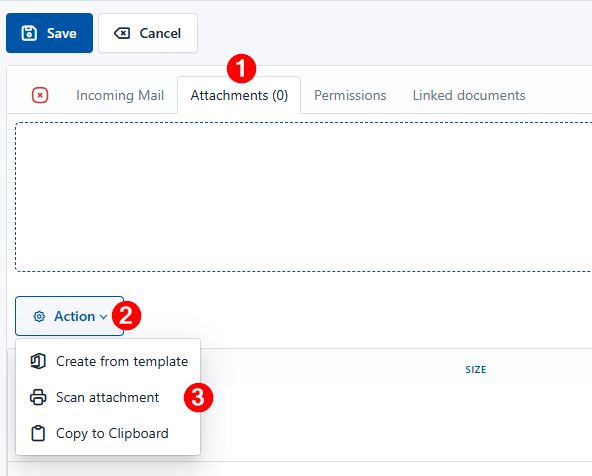
You can access the installation file from mDocs+ by clicking on the document's attachments in editing mode → Operation → Scan attachment
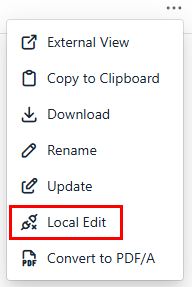
Another way to access the installation file is in the document's editing mode -> Attachments -> select options next to the added attachment -> select the Edit with local program option
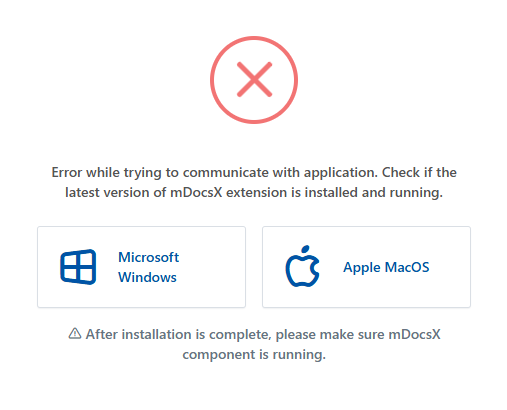
When the installation prompt appears, click Download (depending on your operating system) and save the installation file.
Installation instructions:
- Run the installation file with administrator rights (right-click → Run as administrator).
- Follow the installation wizard and complete the process
- If necessary, restart mDocs+ after installation
- Go back to the document's editing mode
- Select local file editing on the document again
- The document will automatically open in the default editing tool (e.g. Word for .docx)
After the changes, a notification confirming the changes were successfully saved by the local program will appear.

Note: The mDocsX component is installed only once per computer.