Creating an attachment from a template
If you have document templates available, you can quickly create a document with pre-prepared structures.
What is a template?
A template is a pre-prepared document (e.g. Word or PDF) with fixed elements included and marked variables (e.g. [client_name], [date], [amount]), which are automatically replaced with actual data upon creation.
Steps for using a template:
- On the "Attachments" tab, click "Operation".
- Select the "Create from template" option
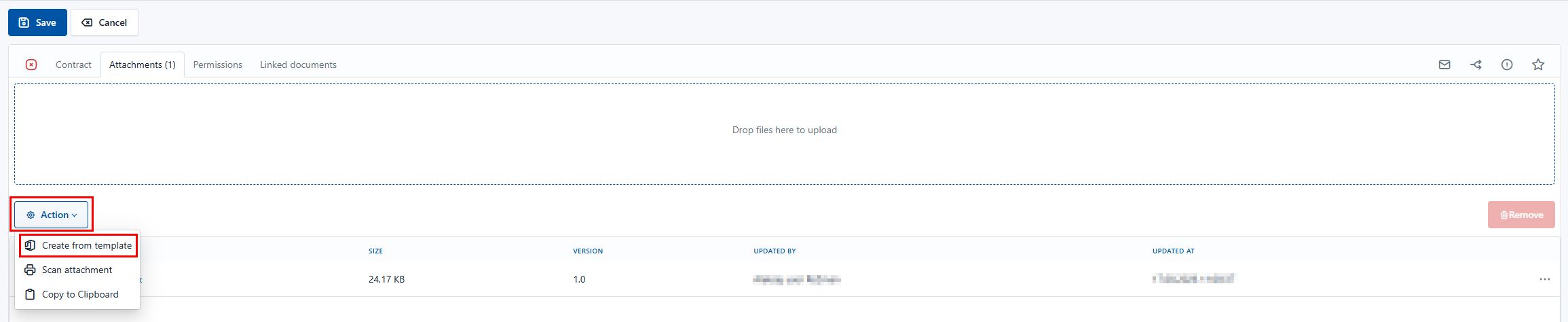
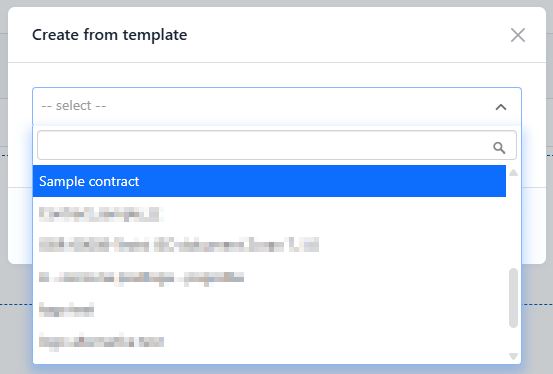
- Select the desired template from the list.
- Fill in the form with metadata – the system automatically transfers the values to the appropriate places in the document.
- Adjust the content as needed.
- The document is saved and ready for the next steps (e.g. signing, forwarding).
Benefits of using templates
✅ Consistent document structure
✅ Fewer writing errors
✅ Faster work and automation
✅ Easier tracking of changes and versions
✅ Compliance with company rules or legislation
The available settings and usage options depend on the settings and business processes of your organization.